Showing posts with label Installations. Show all posts

Sunday, June 2, 2019

Switcing python versions in Anaconda


You can easily maintain separate environments for Python 2 programs and Python 3 programs on the same computer, without worrying about the programs interacting with each other. Switching to an environment is called activating it.
Please follow below link
https://docs.anaconda.com/anaconda/user-guide/tasks/switch-environment/

Thursday, June 15, 2017

installing PyHook Module on windows

Here is how to install pyHook:
1.You can find the download link here http://www.lfd.uci.edu/~gohlke/pythonlibs/#pyhook
2.If you have python 32bit you want pyhook 32 bit (Download #1 for Python 2.7).
3.If you have python 64bit you want pyHook 64 bit (Download #2 for Python 2.7).
4.Extract the zip file.
5.In the command prompt navigate to the folder where you extracted the .zip.
6.Type the command 'pip install pyHook-1.5.1-cp27-none-win32.whl' for the 32 bit version or 'pip install pyHook-1.5.1-cp27-none-win_amd64.whl'

Tuesday, May 30, 2017

Setting path at Windows


To add the Python directory to the path for a particular session in Windows −

At the command prompt − type path %path%;C:\Python and press Enter.

Note − C:\Python is the path of the Python directory

Installing Python 2.7

How to Install Python 2

Installing Python 2 is a snap, and unlike in years past, the installer will even set the path variable for you (something we’ll be getting into a bit later). Run the installer, select “Install for all users,” and then click “Next.”
On the directory selection screen, leave the directory as “Python27” and click “Next.”
On the customization screen, scroll down, click “Add python.exe to Path,” and then select “Will be installed on local hard drive.” When you’re done, click “Next.”
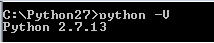
You don’t have to make any more decisions after this point. Just click through the wizard to complete the installation. When the installation is finished, you can confirm the installation by opening up Command Prompt and typing the following command:
python -V

Success! If all you need is Python 2.7 for some project or another, you can stop right here. It’s installed, the path variable is set, and you’re off to the races.